PostgreSQL standalone
Your application Its own replica count
Private connection
Database
One PostgreSQL instance with its own resources, lifecycle and private endpoint.
Hakopod runs PostgreSQL, Redis, MySQL, MongoDB, ClickHouse, Vitess, Oracle Database Free and DuckDB as managed databases on your own servers. Each one is private by default, backs up encrypted to any S3-compatible store, and restores into a copy you check before your app switches over.
Topology examples / PostgreSQL and Redis
One PostgreSQL instance with its own resources, lifecycle and private endpoint.
A primary and one to six replicas on CloudNativePG, which handles replication and primary recovery.
One Redis instance. Backups keep values and expiry and go to any S3-compatible store.
Data is distributed across shards, each with a replica in this example. Your app needs a cluster-aware client.
Illustrative topology, not live cluster state. Replicas still need capacity and separate failure domains for availability.
A short look at database topology, member resources and recovery.
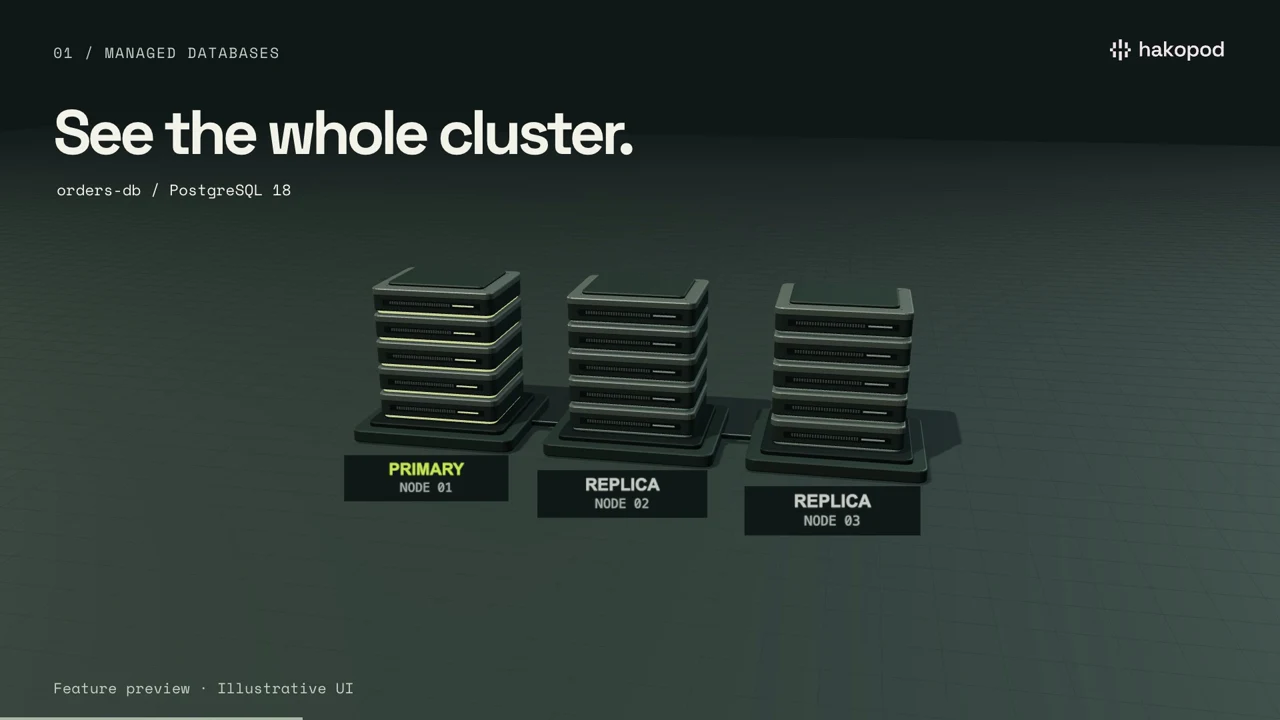
Feature preview · Illustrative UI · Some features shown are in development
Read film descriptionIt's one screen per managed database: a SQL console, connection tests, per-app PostgreSQL databases and logins, and every member's role and measured CPU and memory. The same queries run from the CLI, the API and MCP.
This illustration uses example data to show the layout. It isn't a live dashboard.
Configuration records, not detected live sessions.
One sample a minute, kept for 24 hours. Stale data is marked.
20 s, 1,000 rows and 1 MiB per query, in the dashboard, CLI, API and MCP.
Open the SQL console in the dashboard, or run hakopod database query from the CLI. The API and MCP use the same caps: 20 seconds, 1,000 rows
and 1 MiB per query. Agents stay read-only unless you start them with --allow-sql-write.
Test a connection before you point an app at a database. On PostgreSQL, create a separate database and login for each app, so every service has its own credentials.
Applications, private endpoint routes and database members have separate lanes. Select a member to inspect its role and placement; Redis groups use the observed shard identities.
Connections come from saved bindings, the last successful deployment and the latest attempt. They do not prove an open database session, and manually entered credentials are not discoverable.
The cockpit uses samples matched to owned member pods and retains a bounded history in the control plane: one sample per minute for 24 hours, including while the page is closed. Missing, incomplete, stale or previous-revision observations are not presented as current usage.
Native activity includes connection counts, data size and supported engine counters. PostgreSQL can report replay backlog in bytes. Filesystem usage, query latency and traffic rates are not collected. The topology lines represent relationships, not measured traffic.
Keep backup records and durable operations outside the topology view. Restore a verified archive to a separate unused target, inspect the recovered data, then review the application connection change.
Inspection does not connect an application. The reviewed connection replacement updates its saved binding and queues a redeployment.
 PostgreSQL 17 / 18 · Cloud beta
Run one instance, or a primary with one to six replicas, managed by CloudNativePG. Your app gets private read/write and read-only endpoints, with optional PgBouncer pooling on each. Move the primary on purpose with a switchover, and the controller handles primary recovery when one fails.
Scaling your app never changes the database's replica count.
 Redis 8 · Cloud beta
Run one Redis instance or spread data across shards, each with replicas. Add or remove shards after you review the change: Hakopod checks cluster health and slot ownership first, then waits for the new layout. Backups keep values and their expiry.
Redis Cluster needs a cluster-aware client.
 ClickHouse 26.3 · Self-hosted
Run a standalone server or replicated shards with a three-member Keeper quorum. Connections use private TLS, your apps bind to it like any other database, and recovery restores each shard into a separate target.
Queries across shards need Distributed tables or explicit shard routing.
 MySQL 8.4 · Self-hosted · AMD64
Run one member or a cluster of three, five or seven voting members. MySQL Router gives your app separate primary and replica routes, and every connection requires TLS.
Runs on AMD64 workers. No point-in-time recovery.
 MongoDB 8.0 · Self-hosted
Start with one member or run a replica set of three, five or seven, and let your driver discover the members. Lifecycle, resizing, elections and recovery passed native development checks.
Needs a driver that understands replica sets.
 Oracle Database Free · Self-hosted · AMD64
One Oracle Database Free instance with an APP schema in
FREEPDB1, reachable over private TCPS on port 2484 and
run by a namespace-scoped operator. Oracle Free is proprietary,
no-cost software.
Free caps it at 2 CPUs, 2 GB of database memory and 12 GB of user data. Enterprise and Data Guard aren't available.
 DuckDB (MyDuck) Self-hosted · AMD64
MyDuck serves one persistent DuckDB database on port 3306 for MySQL clients and port 5432 for PostgreSQL clients. Point the tools you already have at an analytical database. It runs as a single private instance, without replicas or automatic failover.
Wire compatibility doesn't cover every MySQL or PostgreSQL feature.
 Vitess Self-hosted · AMD64
Spread MySQL across 1, 2, 4 or 8 shards with one to five replicas per shard. Two vtgate gateways route queries using an explicit VSchema, all on private Linux AMD64 workers you dedicate to it.
Topology is fixed at creation; online resharding isn't available.
Each engine needs its controller, which an operator installs with the installer modules, plus workers and storage that fit it. Hakopod Cloud offers PostgreSQL and Redis in eligible workspaces. Replicas on one worker or VM don't stay up if that worker, VM or shared disk is lost.
Hakopod restores a verified backup into a separate database while your original keeps running. You inspect the copy, then replace the app's saved connection and redeploy. Backups are encrypted, sent on a schedule to any S3-compatible store, and read back to verify them.
A verified backup.
A separate database.
Check the recovered data.
Confirm your review.
Replace the saved connection.
Redeploy your app.
A restore brings back the data as of the backup. It isn't point-in-time recovery, and writes made after the backup don't follow. Pause writes and take a fresh backup before the final switch if you need them.
These checks ran on development infrastructure. They don't establish production availability or an uptime guarantee.
Read the development acceptance recordYes, in beta: eligible Cloud workspaces can run managed PostgreSQL and Redis. The other six engines run on self-hosted installs. Signing up doesn't guarantee database capacity, and on a self-hosted install an operator installs each engine's controller, workers and storage first.
Yes, read-only unless you allow writes. Start hakopod mcp --allow-sql and an agent can run queries capped at 20 seconds, 1,000 rows and 1 MiB;
writes need --allow-sql-write. Keys are scoped to one
project and environment, and the audit log stores a hash of each
command. See what agents can do.
No. A restore brings back the data as of a backup. Schedule backups hourly or daily, and take a manual one before a risky change.
No. Import a Docker backup into a separate managed database while the source keeps running. Inspect the copy before you replace your app's connection. Changes after the capture point need a fresh capture before the final switch.
No. Replicas need their own compute and storage. A cluster on one worker or VM can't stay up if that worker, VM or its shared disk is lost. Redis Cluster also needs a cluster-aware client.
The published Cloud launch plans cover the dashboard and control plane; your servers are billed by your provider. Paid checkout is not open yet, and there's no separate database price.